A Rainy Afternoon, One Film, No Scrolling
A rainy-afternoon film plan helps you prepare a comfortable viewing space, manage interruptions and stay with the story instead of reaching for your phone.
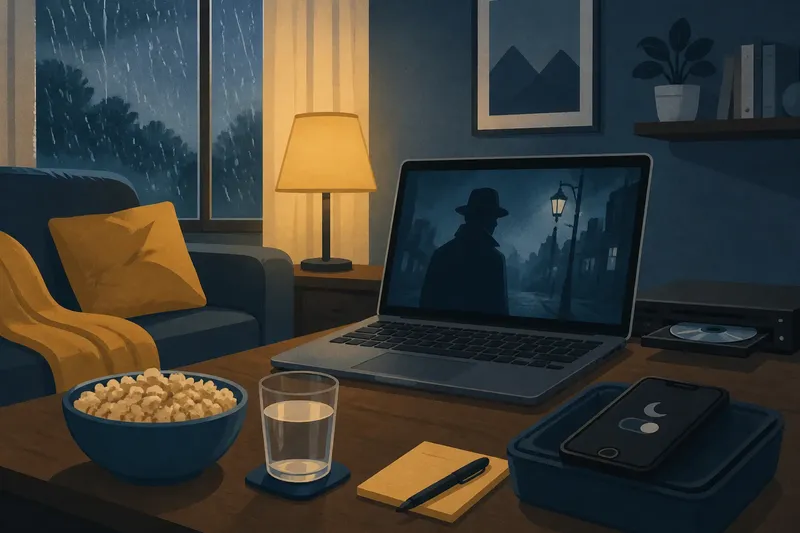
A rainy-afternoon film plan is easier to enjoy when the room is ready before the opening scene. Set up your screen, sound and phone around the film you have already chosen, so small practical distractions do not keep pulling you away.
Prepare the room
Make the viewing space comfortable and usable, rather than treating it as a special project. Adjust a lamp to reduce glare, place a cushion or blanket where you can reach it, and set a drink on a stable surface before starting.
Check the television or laptop volume and subtitles with a short preview or the film’s opening screen. If dialogue is hard to hear, adjust the sound before play; if subtitles are difficult to read, change their size or contrast in the device settings.
Choose a viewing source
Decide how you will watch before settling in. A streaming app, DVD or Blu-ray player, television recording, or a film borrowed from a library can each suit a different setup; check that the chosen source is ready to play rather than discovering a missing disc or login after you sit down.
If you use a streaming service, open the title directly from a saved list or search for it by name. If the service has autoplay, switch it off when you would rather have the ending stand on its own and decide later whether to watch anything else.
Put the phone aside
Choose a specific place for your phone before pressing play. Face-down on a shelf, charging in the hall, or set to a focus mode are practical options; keep it accessible if you need to receive an urgent call, but silence alerts that can wait.
Close unrelated browser tabs and other screens as well. If you want to look up a cast member, a location or a plot detail, make a brief note and search after the credits instead of interrupting a scene.
- Phone within reach: If the screen lights up whenever an alert arrives, move the phone to a shelf or enable focus mode; if you must monitor urgent messages, keep sound for those contacts and silence other notifications.
- Glare on the screen: If a lamp reflects across the picture, move it to the side or switch it off; if the room becomes too dark to move safely, leave a low, indirect light on.
- Dialogue hard to hear: If voices are unclear, adjust the television volume or dialogue setting before the film begins; if sound would disturb someone nearby, use comfortable headphones instead.
- Subtitles difficult to follow: If text blends into bright scenes, change the subtitle size or background in the device settings; if the setting is unavailable, sit closer or choose a source with clearer subtitle options.
- Uncertain playback source: If the app asks for a login or the disc will not load, resolve that before getting comfortable; if it cannot be fixed promptly, switch to another ready source or choose a different activity.
- Likely household interruption: If someone needs the room or may call you, agree on a signal or pause point beforehand; if you cannot be available for the film, save it for a quieter time.
Keep the story in view
Let the film unfold without checking its runtime or reading reactions during a scene. If a question occurs to you, remember it or jot down a few words; looking it up afterwards protects the moment from spoilers and gives the story room to develop.
Say you have a laptop, a borrowed DVD and a phone that keeps lighting up with group-chat alerts. You place the laptop on a stable table, connect the DVD player, switch the phone to focus mode while allowing calls from a family contact, and set a glass of water nearby. The observable result is that the film starts without app browsing, the group-chat alerts stay out of sight, and an urgent call can still reach you.
When should you pause?
What if someone interrupts the film?
Pause when you need to answer or handle a task, then return once you can give the screen your attention. If interruptions keep coming, stop and resume at a calmer time rather than watching in fragments.
How can I make subtitles easier to read?
Open the playback or accessibility settings and adjust subtitle size, colour or background if those controls are available. Check the result against a bright scene before continuing.
What should I do if the sound bothers someone?
Lower the volume or use comfortable headphones if you can still hear any household sounds you need to notice. If neither option suits the room, pause the film or move to a time when the sound will not disturb others.
Can I leave the film unfinished?
Yes. Pause at a clear scene break if one is near, note where you stopped, and return when you have a suitable stretch of attention.
Resume without fuss
If you pause for a delivery, meal or call, note the scene or use the player’s bookmark so you can return without searching through the timeline. When you resume, replay a short section if needed to recover the plot, then put the phone back in its place.
A useful rainy-afternoon film plan depends on practical choices: a working playback source, a room you can see and hear comfortably, and a phone arrangement that suits your responsibilities. Make those choices before the film begins, and the rest of the afternoon can follow the story rather than the screen’s distractions.